
The New Trustify Dashboard: A 360° View of Your Review Marketing
With the new Trustify Dashboard, organizations gain a centralized overview of reviews, tasks, and reputation. Intelligent insights, real-time monitoring, and centralized task management help teams respond faster and continuously improve their review performance.
With our latest update, we are introducing a completely redesigned dashboard. The previous homepage has been replaced by a modern control center that brings together all reviews, tasks, and activities of an organization in one place.
Rather than providing a simple overview, the new dashboard delivers a true 360° view of review performance and immediately highlights where action is required.
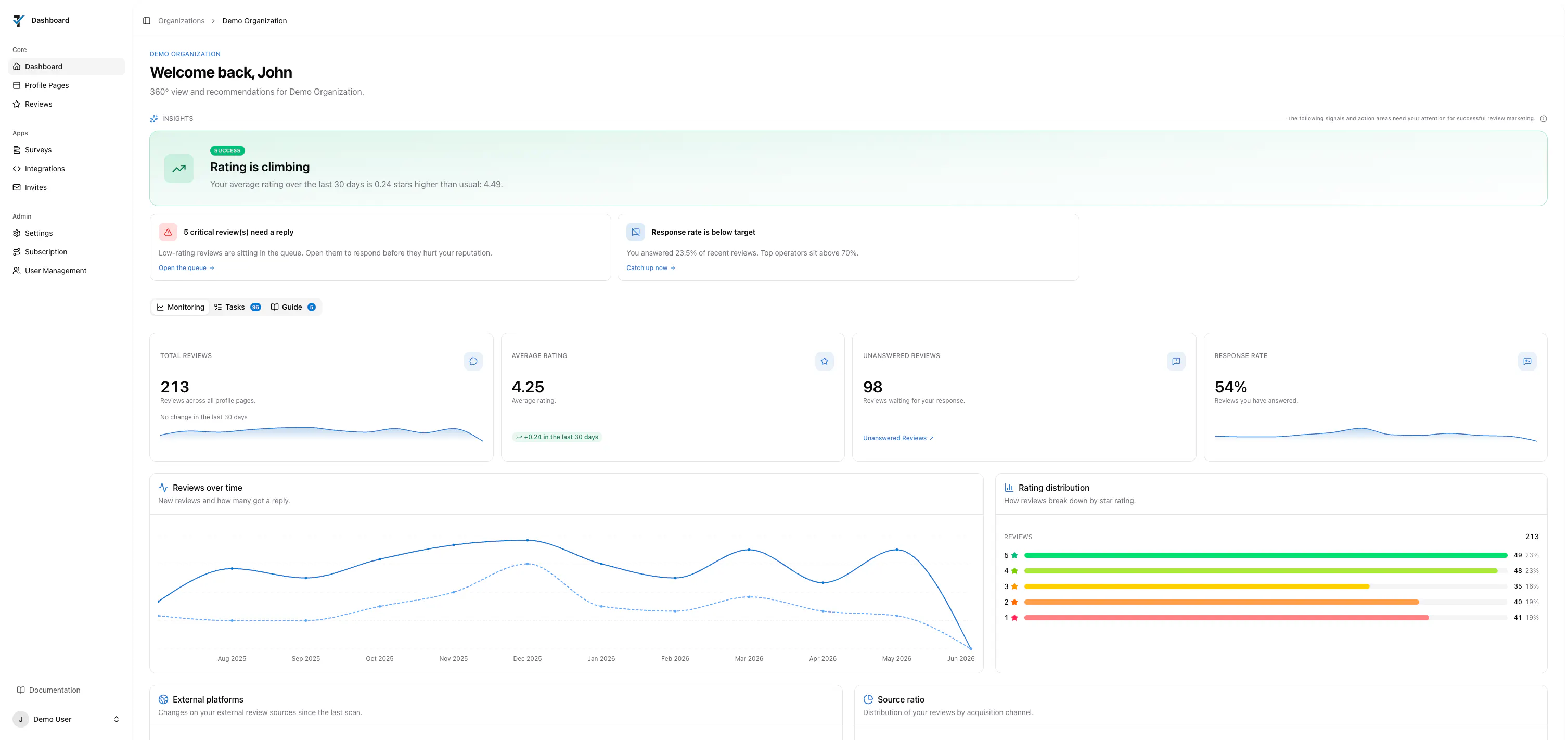
Intelligent Insights: The Most Important Information First
At the top of the dashboard, the new Insights Bar automatically analyzes data and trends from the last 30 days, highlighting the most important signal at any given time.
Whether the review score has improved, critical reviews are still awaiting a response, or the response rate has fallen below target, Trustify proactively notifies teams and links directly to the relevant action. This enables organizations to respond early, before issues impact their reputation.
Monitoring: All Key Metrics in One Place
The Monitoring section provides real-time visibility into how reviews are developing across all profile pages. Every metric is accompanied by a trend indicator covering the last 30 days. The dashboard also includes detailed analytics, such as:
- Review trends over the last 12 months
- Review trends across external platforms
- Distribution of star ratings
- Reviews by source (direct reviews, invitations, and external platforms)
- Reviews by language
This creates a centralized overview of an organization's entire review landscape.
Tasks: Efficiently Manage Open Reviews
The Tasks tab consolidates all pending activities in one place.
The Action Queue displays all reviews that have not yet been reviewed. Reviews with low star ratings are automatically prioritized and appear at the top of the list. Each review can be responded to directly or marked as reviewed.
A recommended best practice is to regularly reduce the queue to zero. Not every review requires a response, but every review should be reviewed. The centralized queue makes this process simple and efficient, even for organizations with multiple locations or profile pages.
In addition, the Tasks tab displays the completion status of the organization and all profile pages. Missing settings or incomplete configurations are immediately visible and can be completed directly through the provided links.
Guide: Recommendations, Apps, and Helpful Resources
The Guide section helps organizations unlock the full potential of Trustify.
Personalized recommendations, for example, notify users when no survey has been created yet or when important review sources are missing. This ensures that optimization opportunities do not go unnoticed.
The Guide also provides an overview of all available Trustify apps, including a brief description, key benefits, and direct access links.
More Visibility, Less Effort
The new Trustify Dashboard is far more than a navigation tool. It brings together the most important information in one place, makes required actions visible at an early stage, and helps teams actively manage their online reputation.
The result is less effort, faster response times, and a clear overview of all reviews and activities.
For more information about the new interface, please refer to the documentation.